A VMware Outage Postmortem: Tracing Impact from VM to Rack to Power Feed
Published on January 8, 2026,
by

Outages rarely stay confined to a single layer, they ripple across virtual, physical, and power infrastructure. When a VMware incident occurs, the challenge isn’t just identifying the failure; it’s understanding how it impacts interconnected systems. In this blog, we’ll explore a real-world scenario and demonstrate how Nlyte’s Data Center Infrastructure Management (DCIM) platform provides end-to-end visibility, mapping relationships from VM to host, rack, PDU, and the entire power chain. By exposing the root cause and its cascading effects, Nlyte accelerates mean time to repair (MTTR) and helps teams restore service quickly and confidently.
Why Outage Postmortems Matter
Today’s data centers are complex. For virtualization leads, Site Reliability Engineers (SREs), and incident commanders, a single outage can ripple across virtual and physical layers. When this happens, the impact is immediate and costly.
Traditional monitoring tools often stop at the VM or host level. As a result, teams remain blind to deeper dependencies within the stack. This lack of visibility slows response times and increases downtime.
That’s where VMware DCIM integration comes in. By connecting VMware environments with DCIM platforms, teams gain a complete view of their infrastructure. Advanced dependency mapping ensures that every layer, from virtual machines to physical assets, is monitored and linked.
With this integration, organizations can quickly identify root causes, reduce downtime, and improve Mean Time to Repair (MTTR). It also enables proactive planning, better resource allocation, and stronger resilience against cascading failures.
A Realistic VMware Outage Scenario
Imagine a critical business application suddenly goes offline. Initial investigation points to a VM failure, but the root cause isn’t immediately clear. Was it a host issue? A rack-level power event? Or something further upstream in the power chain?
Step 1: Map the Virtual Machine
Start with the virtual layer. Identify the affected VM immediately. Nlyte’s integration delivers instant visibility into VM placement and its relationships. This dependency mapping ensures teams know exactly where the issue begins.
Step 2: Identify the Host
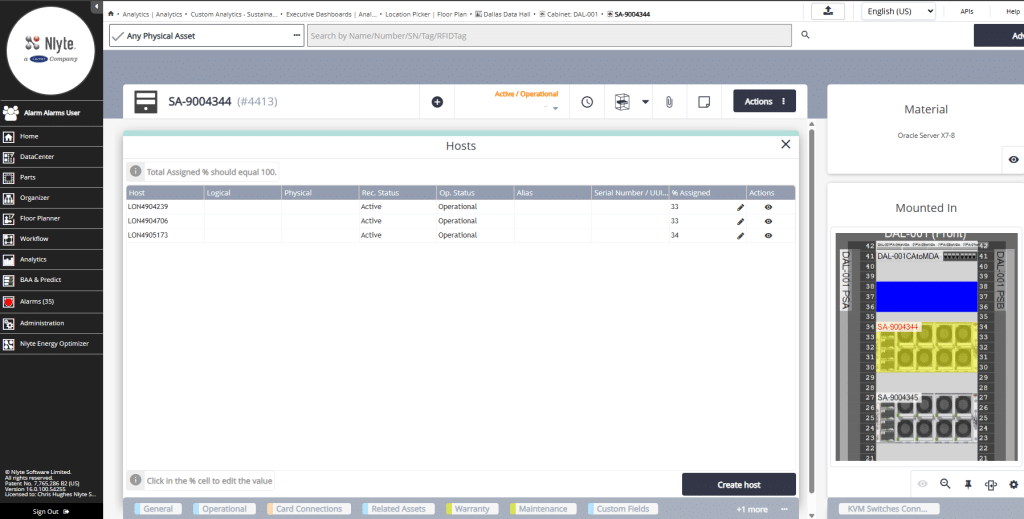
Next, trace the VM to its ESXi host. Understanding this link is critical because host failures often impact multiple virtual machines. Quick identification accelerates troubleshooting and keeps MTTR low.
Step 3: Pinpoint the Rack
After locating the host, move to the physical layer. Nlyte’s DCIM platform pinpoints the exact rack housing the host. This step helps determine whether the outage is isolated or part of a larger infrastructure problem.
Step 4: Locate the PDU
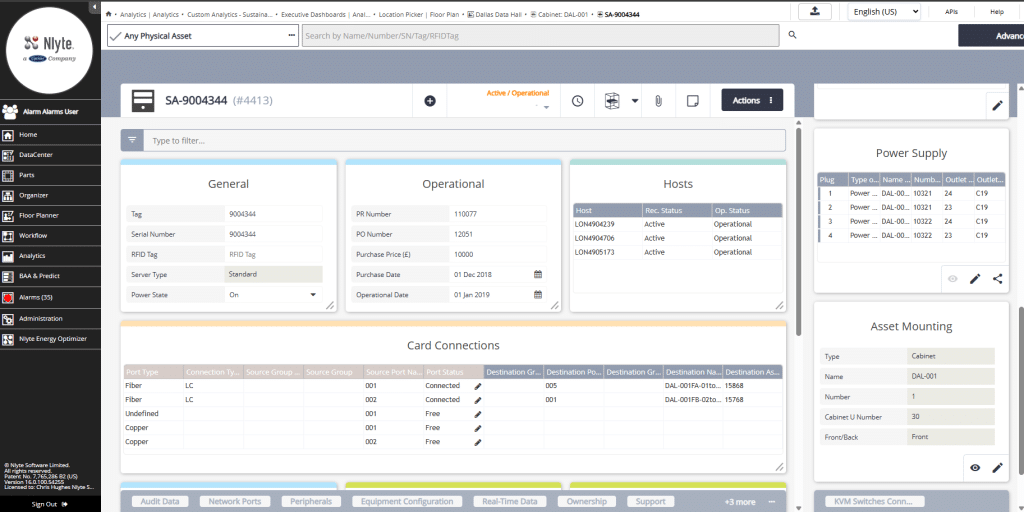
From the rack, trace to the connected Power Distribution Unit (PDU). This mapping is essential for assessing power dependencies and identifying potential hardware risks.
Step 5: Analyze the Power Chain
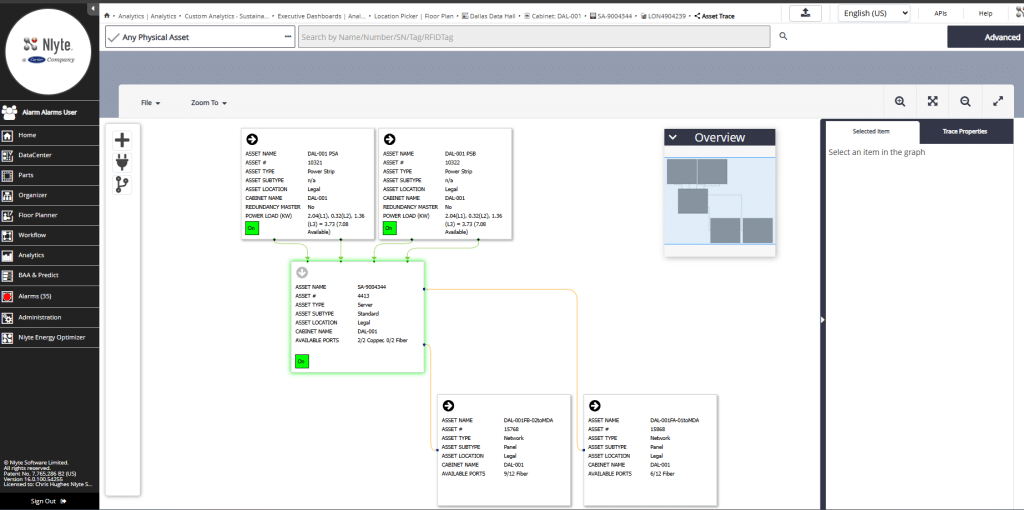
Finally, drill into the entire power chain. Nlyte provides real-time monitoring and historical telemetry for PDUs and upstream feeds. If a breaker trip or voltage anomaly occurs, it is instantly correlated with the affected VM and host. This comprehensive view exposes root causes and strengthens outage postmortem accuracy.
Why Dependency Mapping Accelerates MTTR
Try the Dependency Mapping Demo
Ready to see how Nlyte’s VMware DCIM integration can transform your outage response?
Take the next step toward faster root cause analysis and reduced mean time to repair.
Request a demo with one of Nlyte’s experts today to receive a personalized live demo and discover how advanced dependency mapping and power chain visibility can strengthen your data center operations. > Request a Demo | Nlyte